
Waypoints Navigation
The Waypoints Navigation module can turn your Personal Bot into a 24/7 automatic walking tour-guide for your land and it's visitors with abilities to await for special command, sit & stand, walk, run, talk, use animations and sounds as it goes and much, much more!
If you have a huge, or even small land in Second Life that requires someone to explain what it's about tirelessly just by sending it an IM (Or even automatically, without any stops) - the following module is your choice!
Overview
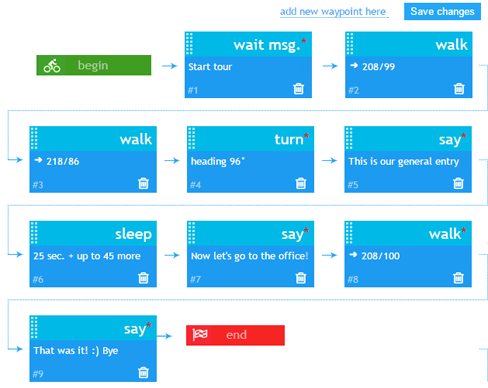
- You configure your simple tour with several waypoints, or a very complex one with multiple advanced commands!
- Your bot starts executing your indicated commands within your configuration
How to Activate & Use
Step 1. Purchase the module
- You can Purchase it from the bot store.
- Attach it to you bot. (Works with both Personal Bot Types)
Step 2. Configure it!
- You can visit Setting up waypoints page in-order to start configuring your module.
- The commands of WayPoints Navigation module is being constantly updated, please visit Waypoint_Navigation_Commands web-page in-order to find out more.
Step 3. Use it!
- You can also use the in-world helper device, to quickly bring some changes to your current configuration of module, too!
Troubleshooting and known issues
- My bot stops before reaching the waypoint and skips to the next one.
- It's possible that your bot is hitting something and getting stuck on the way to the waypoint.
- The bot doesn't move once saving changes?
- This is a know bug we are working to resolve. Please contact us using the live chat to find out the reason.
- Something else wrong?
- Contact our live chat or in-world support for more help!