
Waypoint Navigation Commands
This page contains a reference of actual Waypoints Navigation commands. We add new commands to the list, feel free to send us your wishes (see the "Ideas" section at the bottom).
1. Movement Commands
| Command | Description |
|---|---|
| Teleport | Teleports your bot to any SL location |
| Walk | Walk to any designated point by using coordinates. |
| Run | Run to any designated point by using coordinates. |
| Turn | Your bot turns to any Celsius degree heading |
2. Avatar Commands
| Command | Description |
|---|---|
| Sit | Sit on object |
| Stand | Stand up from an object |
| Animate | Play the animation item from bot's inventory. |
| Sound | Play the sound item from inventory |
| Key Press | Bot presses the keyboard key. Read "Details" below for more info |
3. World interaction
| Command | Description |
|---|---|
| Touch prim | Touch your specified in-world object (by object UUID). See Waypoint Touching Prims page for more info. |
| Touch attachment | Touch bot's attachment (wearable or HUD) by object name. See Waypoint Touching Prims page for more info. |
4. Messaging
| Command | Description |
|---|---|
| Say | Send message to local chat. |
| Wait.Msg | Wait for a specific IM or local chat message to execute next waypoint.
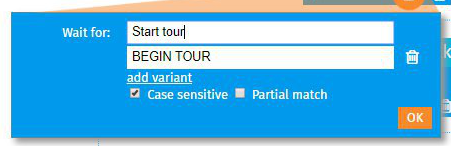 Options:
The most flexible match is to uncheck Case sensitive and check Partial match. |
5. Program Controls
| Command | Description |
|---|---|
| Sleep | Sleep (don't do nothing) for required time |
| Repeat | Jump to a specific waypoint, with configurable amount of repeats |
Any ideas?
If you get any wishes or requests, do not hesitate to contact our support!