
Group Tenancy (add-on)
| Line 13: | Line 13: | ||
Major features: |
Major features: |
||
| - | + |
* Set the rent time and price (e.g. "L$99 for 7 days" |
|
| - | + |
* Set the retention period (e.g. "wait 1 day before ejection") |
|
| - | + |
* Automatically invite tenant to the required role |
|
| - | + |
* Automatically eject expired tenants |
|
| - | + |
* Set up greeteng/notification IMs |
|
| - | + |
* View current tenants |
|
| - | + |
* View payments history |
|
| - | + |
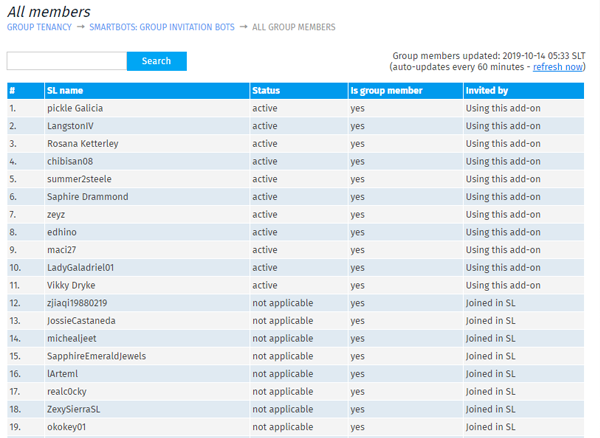
* View all group members |
|
[[Image:GT_Summary_page.png|center|link=|600px|border]] |
[[Image:GT_Summary_page.png|center|link=|600px|border]] |
||
| Line 26: | Line 26: | ||
== How it works & Configuration == |
== How it works & Configuration == |
||
| - | # |
+ | # Add group to add-on (see [[Group_Tenancy_Configuration|Configuration]])
|
| - | # |
+ |
# Get and rez a Terminal
|
| - | # |
+ | # Resident pays your Terminal and gets a group invitation
|
| + | # Once membership term expires, tenant gets ejected from group |
||
[[Image:GT_Group_Invitation.png|center|link=|600px|border]] |
[[Image:GT_Group_Invitation.png|center|link=|600px|border]] |
||
| - | + | Bot sends IMs to the tenant:
|
|
| - | + | * once the payment is made, the '''greeting IM''' is being sent |
|
| + | * when membership is about to expire, bot sends a '''reminder IM''' |
||
| + |
* '''notification IMs'' can be sent to you and your managers
|
||
| - | + | See [[Group_Tenancy_Configuration]] for more info. |
|
| - | You can |
+ | == Payments history == |
| + | |||
| + |
All payments are being stored. You can view the payment history for all your groups. |
||
[[Image:GT_Payments.png|center|link=|600px|border]] |
[[Image:GT_Payments.png|center|link=|600px|border]] |
||
| - | == Monitor active/expired members == |
+ | == Monitor active/expired members == |
| - | + |
If you process some payments manually, paid members can be added from web interface. Invitation can be re-sent if necessary, or be manually ejected.
|
|
| - | + | ||
| - | + | ||
[[Image:GT_Paid_members.png|center|link=|600px|border]] |
[[Image:GT_Paid_members.png|center|link=|600px|border]] |
||
| - | + |
You can monitor the whole group members: paid, unpaid, about to expire, not joined yet.
|
|
[[Image:GT_All_members.png|center|link=|600px|border]] |
[[Image:GT_All_members.png|center|link=|600px|border]] |
||
| - | == |
+ | == Payment Terminal == |
| - | + |
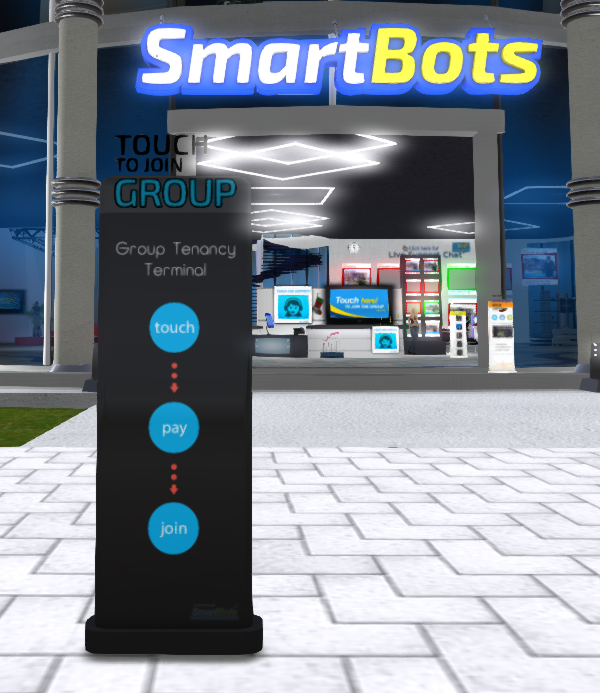
The Payment Terminal is available for free. It allows your members to pay & prolong their membership. |
|
[[Image:GT_Payment_terminal.png|center|link=|600px|border]] |
[[Image:GT_Payment_terminal.png|center|link=|600px|border]] |
||
| - | |||
| - | |||
| - | |||
| - | |||
| - | |||
== How to purchase == |
== How to purchase == |
||
Revision as of 11:38, 15 October 2019
This is a bot add-on:
1. Get this addon:
- Buy in web Bot Store
- Then attach to your bot
2. Configure in left menu:

Group Tenancy
3. Get more help:
- read docs
- contact support
Overview
Group Tenancy is an add-on for Personal Bots. It allows you to rent out the group membership for a specific time.
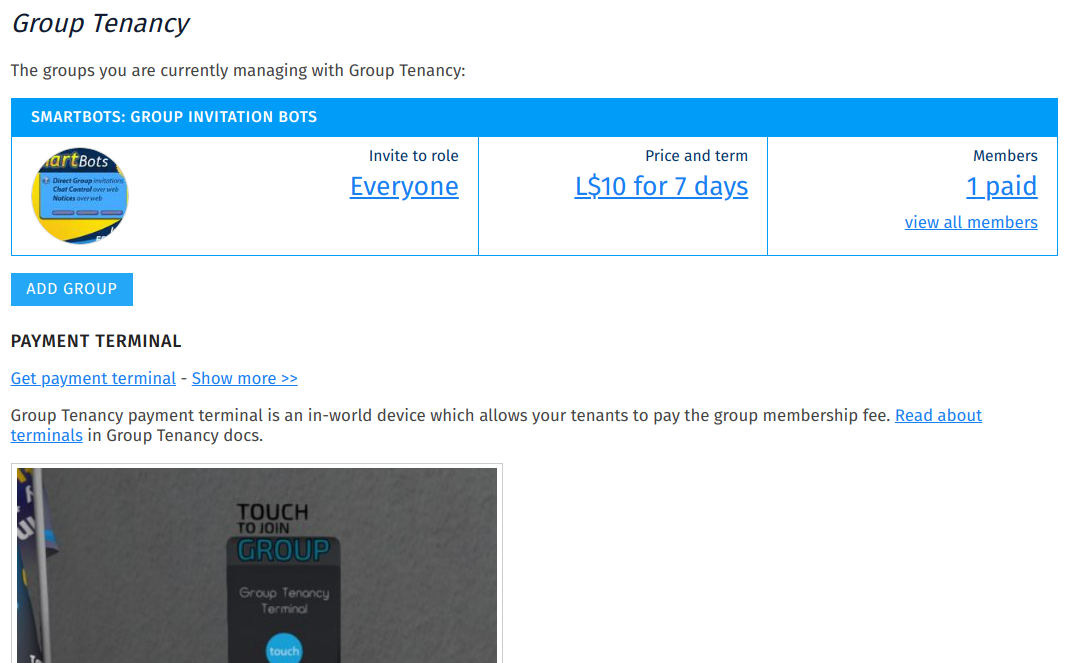
Major features:
- Set the rent time and price (e.g. "L$99 for 7 days"
- Set the retention period (e.g. "wait 1 day before ejection")
- Automatically invite tenant to the required role
- Automatically eject expired tenants
- Set up greeteng/notification IMs
- View current tenants
- View payments history
- View all group members
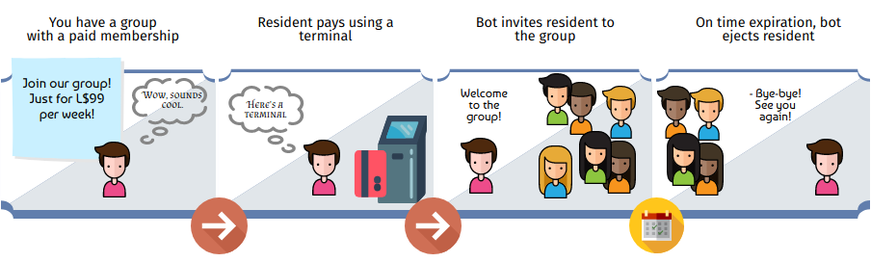
How it works & Configuration
- Add group to add-on (see Configuration)
- Get and rez a Terminal
- Resident pays your Terminal and gets a group invitation
- Once membership term expires, tenant gets ejected from group

Bot sends IMs to the tenant:
- once the payment is made, the greeting IM is being sent
- when membership is about to expire, bot sends a reminder IM
- 'notification IMs can be sent to you and your managers
See Group_Tenancy_Configuration for more info.
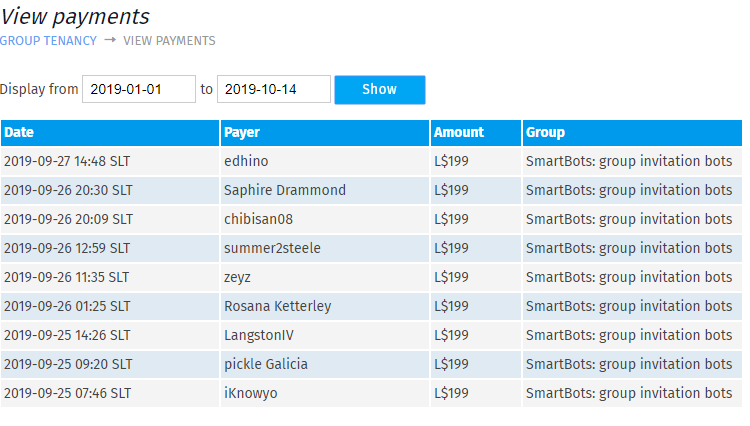
Payments history
All payments are being stored. You can view the payment history for all your groups.
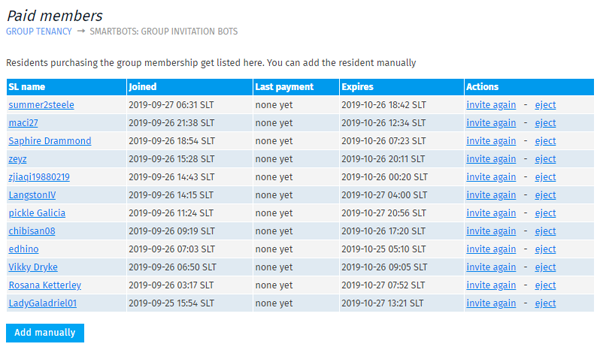
Monitor active/expired members
If you process some payments manually, paid members can be added from web interface. Invitation can be re-sent if necessary, or be manually ejected.
You can monitor the whole group members: paid, unpaid, about to expire, not joined yet.
Payment Terminal
The Payment Terminal is available for free. It allows your members to pay & prolong their membership.
How to purchase
See the Purchasing Add-Ons page for step-by-step add-on activation instructions.
Additional information
- This add-on can be used only with a Personal Bot.
- You can refund your add-on purchase within 3 days.