
Group Export
|
|
|||
| (3 intermediate revisions not shown) | |||
| Line 1: | Line 1: | ||
| + | '''Group Export should be used only from the group's you personally own have access to. Exporting members from other groups you do not own and abusing the system to export members for spam purposes will escalate your case to our Security Team and further administrative actions may be taken against your account.''' |
||
| + | |||
| + | |||
You can export the complete group members list to a text file. The following info can being exported: |
You can export the complete group members list to a text file. The following info can being exported: |
||
| Line 7: | Line 10: | ||
== How to order export == |
== How to order export == |
||
| - | Your group subscription must be active (with any SmartBots service enabled). |
+ | Your group subscription must be active (with any SmartBots service enabled).]
|
| - | [[Image: |
+ |
# Locate the group for which you want to file an order for, hover over the number of members and click export: [[Image:Export1.png|center|border|link=]] |
| - | + | # On the export page select "create new group export request" and then "Order Export": [[Image:Export2.png|center|border|link=]] |
|
| - | # On the |
+ | # Pay for the group export. [[How_to_pay_for_Additional_Services|Step-by-step instructions here]]
|
| - | + | # Download the order on the group export page |
|
| - | # |
+ | |
| - | # Download the export |
+ | |
== Output Formats == |
== Output Formats == |
||
| Line 32: | Line 33: | ||
See the [[Prices]] page. |
See the [[Prices]] page. |
||
| + | |||
| + | '''''You may also [[Transferring Group Members|transfer]] members of one group to another.''''' |
||
[[Category:Existing customers]] |
[[Category:Existing customers]] |
||
Latest revision as of 03:04, 5 May 2023
Group Export should be used only from the group's you personally own have access to. Exporting members from other groups you do not own and abusing the system to export members for spam purposes will escalate your case to our Security Team and further administrative actions may be taken against your account.
You can export the complete group members list to a text file. The following info can being exported:
- Second Life name
- Resident UUID
- Last login date
How to order export
Your group subscription must be active (with any SmartBots service enabled).]
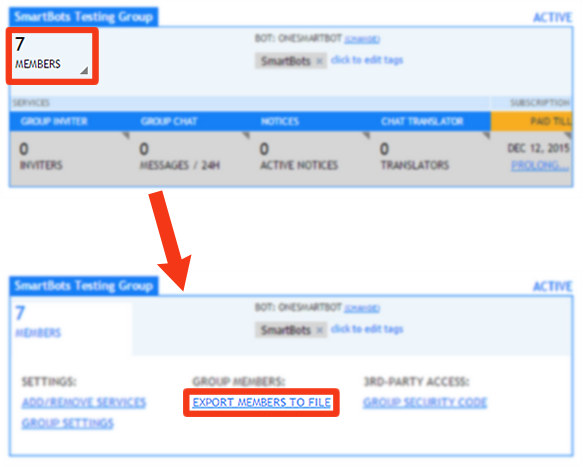
- Locate the group for which you want to file an order for, hover over the number of members and click export:
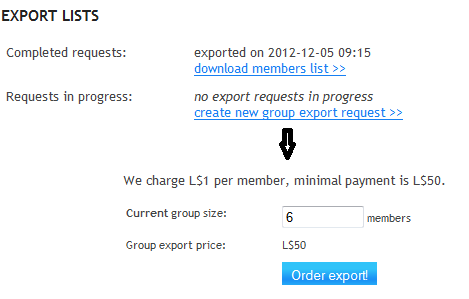
- On the export page select "create new group export request" and then "Order Export":
- Pay for the group export. Step-by-step instructions here
- Download the order on the group export page
Output Formats
The info is being exported in several formats, including generic CSV. The following formats are available:
- LoginDate UUID Firstname Lastname
- LoginDate, UUID Firstname, Lastname
- UUID Firstname Lastname
- UUID, Firstname Lastname
- Firstname Lastname:UUID
- UUID
- Firstname Lastname
The variety of formats is available to allow easy import to other SL tools (for example, ArtiZAN mailers).
Prices
See the Prices page.
You may also transfer members of one group to another.