
Bot inventory
| Line 26: | Line 26: | ||
* [[Group Notices Service]] - send notices with inventory attachments |
* [[Group Notices Service]] - send notices with inventory attachments |
||
* [[Group Inviter Service]] - greeter's features of the group inviter |
* [[Group Inviter Service]] - greeter's features of the group inviter |
||
| - | + | * [[Personal Bot Inventory Browser]] - manage your personal bot inventory |
|
[[Category:Existing customers]] |
[[Category:Existing customers]] |
||
Revision as of 06:54, 10 December 2012
Your bot can hold your any kind of inventory items (notecards, landmarks, objects).
These can be delivered as notices attachments, or offered during the group invitation.
This functionality is available to both shared bots and personal bots.
Uploading inventory items
It's very easy to upload your inventory item to the bot:
- Use Second Life "People" search (CTRL-S) to find your bot by name.
- Drag the inventory item onto the bot's profile
IMPORTANT: Your item MUST be copy+trans, since you are going to give it out. See the "Changing permissions" below.
Changing permissions
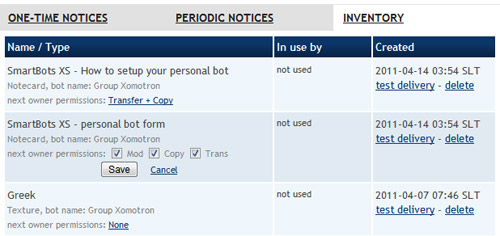
You may want to disable some inventory permissions for the next owners (besides your bot).
For example, you may not want to give transferable gifts to your visitors. To manage that:
- Login to your SmartBots account
- Open your bot's inventory (for example, in "Notices" section)
- Change the item permissions:
Related info
You may want to read more about:
- Group Notices Service - send notices with inventory attachments
- Group Inviter Service - greeter's features of the group inviter
- Personal Bot Inventory Browser - manage your personal bot inventory