
Invite to paid group
|
(Created page with "__NOTOC__ You can setup the SmartBots group inviter to invite to the paid group. link= Category: New customers [[Category: Group Invi...")
|
|
||
| Line 1: | Line 1: | ||
__NOTOC__ |
__NOTOC__ |
||
| - | You can setup the SmartBots group inviter to invite to the paid group |
+ | You can setup the SmartBots group inviter to invite to the paid group:
|
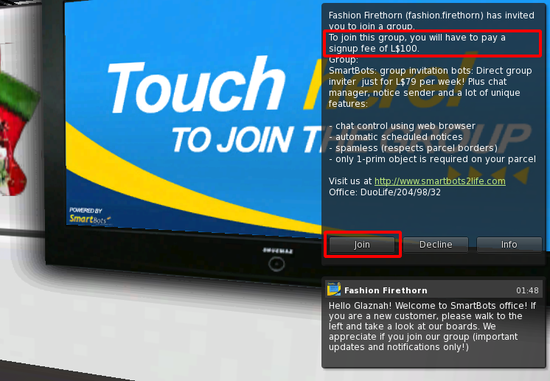
[[Image:join_paid_group.png|center|link=]] |
[[Image:join_paid_group.png|center|link=]] |
||
| + | |||
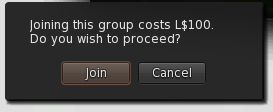
| + | If resident joins the group he has to confirm the payment: |
||
| + | |||
| + | [[Image:join_paid_group_accept.png|center|link=]] |
||
| + | |||
| + | == Configuring the bot == |
||
| + | |||
| + | There are two ways to set the bot for a paid group: |
||
| + | |||
| + | # Make group free, invite the bot, then make group paid again. |
||
| + | # Send the necessary amount of money to the bot, then invite bot to the group. |
||
| + | |||
| + | As soon as bot is in the group, it will be able to send the paid invitations. |
||
[[Category: New customers]] |
[[Category: New customers]] |
||
[[Category: Group Inviter Service]] |
[[Category: Group Inviter Service]] |
||

Latest revision as of 09:53, 25 December 2018
You can setup the SmartBots group inviter to invite to the paid group:
If resident joins the group he has to confirm the payment:
Configuring the bot
There are two ways to set the bot for a paid group:
- Make group free, invite the bot, then make group paid again.
- Send the necessary amount of money to the bot, then invite bot to the group.
As soon as bot is in the group, it will be able to send the paid invitations.