
Group Tenancy (add-on)
|
QuincyJohnes (Talk | contribs)
|
QuincyJohnes (Talk | contribs)
|
||
| Line 9: | Line 9: | ||
'''Group Tenancy''' is an add-on for [https://mysmartbots.com/docs/Personal_Bots Personal Bots] to allow SL groups to rent out membership managed by bot. |
'''Group Tenancy''' is an add-on for [https://mysmartbots.com/docs/Personal_Bots Personal Bots] to allow SL groups to rent out membership managed by bot. |
||
| - | + | [[Image:GT_Summary_page.png|center|link=|600px|border]] |
|
== How it works & Configuration == |
== How it works & Configuration == |
||
| Line 17: | Line 17: | ||
# Chooses the group & pays |
# Chooses the group & pays |
||
| - | + | [[Image:GT_Group_Invitation.png|center|link=|600px|border]] |
|
Once the payment is made, bot sends an '''automatic invitation & greeting message''' with their next payment date. Bot also sends an IM as a '''reminder''' to group members about the expiration, those that will not pay - get '''ejected''' by bot. |
Once the payment is made, bot sends an '''automatic invitation & greeting message''' with their next payment date. Bot also sends an IM as a '''reminder''' to group members about the expiration, those that will not pay - get '''ejected''' by bot. |
||
| - | All of this can be configured, read more here |
+ | All of this can be configured, [https://www.mysmartbots.com/docs/Group_Tenancy_Configuration read more here]
|
== Keep track of payments == |
== Keep track of payments == |
||
| Line 27: | Line 27: | ||
You can also keep track of all the '''membership payments''' via user-friendly page. The specific starting & ending dates can be filtered out, too! |
You can also keep track of all the '''membership payments''' via user-friendly page. The specific starting & ending dates can be filtered out, too! |
||
| - | + | [[Image:GT_Payments.png|center|link=|600px|border]] |
|
== Monitor active/expired members == |
== Monitor active/expired members == |
||
| Line 35: | Line 35: | ||
You can check who joined using Group Tenancy add-on with '''join & expiration dates''', re-invite them manually, or eject from group |
You can check who joined using Group Tenancy add-on with '''join & expiration dates''', re-invite them manually, or eject from group |
||
| - | + | [[Image:GT_Paid_members.png|center|link=|600px|border]] |
|
'''OR''' keep track of all the members at once! Those that joined using Group Tenancy add-on, those that joined through other ways, etc |
'''OR''' keep track of all the members at once! Those that joined using Group Tenancy add-on, those that joined through other ways, etc |
||
| - | + | [[Image:GT_All_members.png|center|link=|600px|border]] |
|
== Group Tenancy Terminal == |
== Group Tenancy Terminal == |
||
| Line 45: | Line 45: | ||
Group Tenancy add-on comes with the special Tenancy Terminal, which allows your members to pay & prolong their membership for specific group(s). |
Group Tenancy add-on comes with the special Tenancy Terminal, which allows your members to pay & prolong their membership for specific group(s). |
||
| - | + | [[Image:GT_Payment_terminal.png|center|link=|600px|border]] |
|
'''How to get it:''' |
'''How to get it:''' |
||
Revision as of 13:16, 14 October 2019
This is a bot add-on:
- Buy in web Bot Store
- Then attach to your bot

- read docs
- contact support
Overview
Group Tenancy is an add-on for Personal Bots to allow SL groups to rent out membership managed by bot.
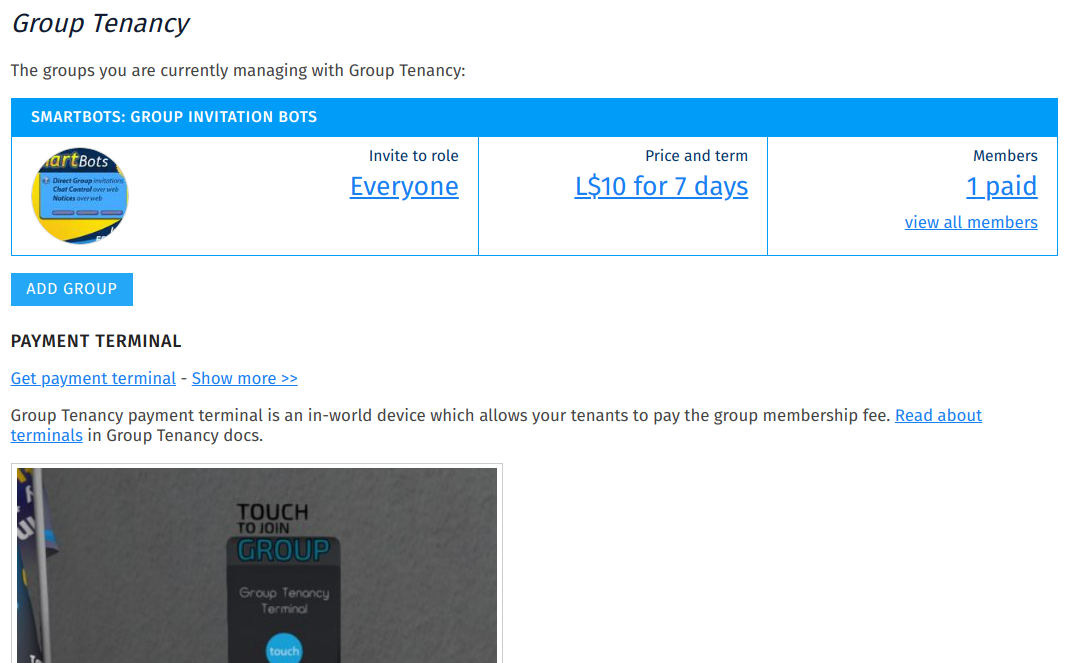
How it works & Configuration
- You add group to addon & rezz a terminal
- Visitor clicks on terminal
- Chooses the group & pays

Once the payment is made, bot sends an automatic invitation & greeting message with their next payment date. Bot also sends an IM as a reminder to group members about the expiration, those that will not pay - get ejected by bot.
All of this can be configured, read more here
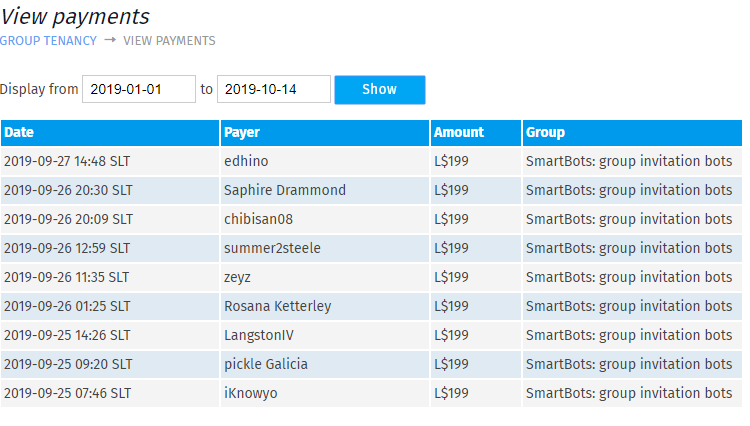
Keep track of payments
You can also keep track of all the membership payments via user-friendly page. The specific starting & ending dates can be filtered out, too!
Monitor active/expired members
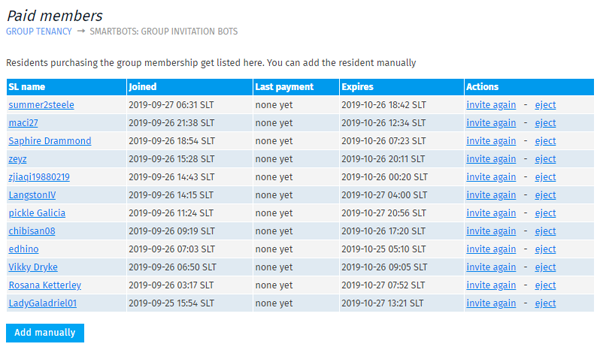
It's important to easily monitor those members that are currently in the group, about to expire, or could not join due to some reasons (Failed to see an invitation, for example).
You can check who joined using Group Tenancy add-on with join & expiration dates, re-invite them manually, or eject from group
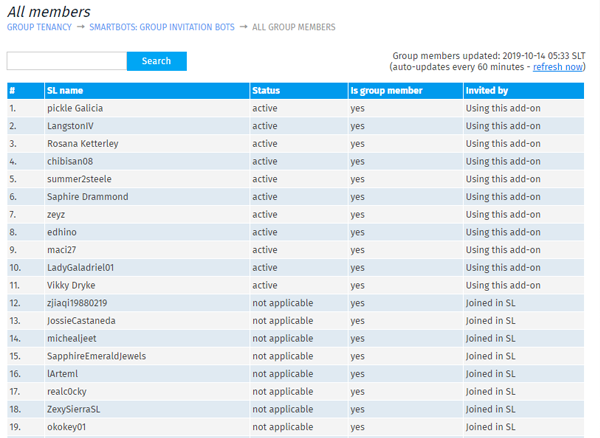
OR keep track of all the members at once! Those that joined using Group Tenancy add-on, those that joined through other ways, etc
Group Tenancy Terminal
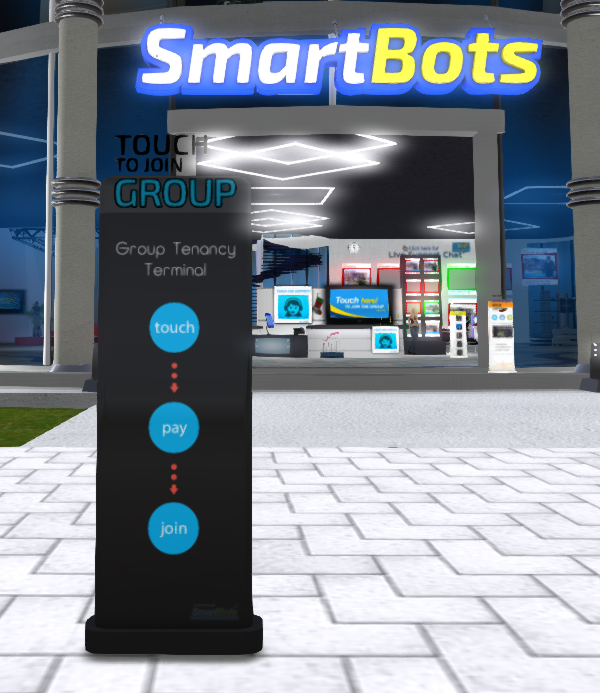
Group Tenancy add-on comes with the special Tenancy Terminal, which allows your members to pay & prolong their membership for specific group(s).
How to get it:
- Visit Group Tenancy page
- Click on Get tenancy terminal
- Rezz it on your land
How to purchase
See the Purchasing Add-Ons page for step-by-step add-on activation instructions.
Additional information
- This add-on can be used only with a Personal Bot.
- You can refund your add-on purchase within 3 days.