
Setting up bot for invitations (SLV)
To send direct group invites you have to setup your group first. It's very easy if you're experienced, otherwise read our instructions below.
Two steps have to be fulfilled to send group invites:
- Bot has to be a member of your group.
- Bot must have the Invite People to this Group ability.
1. Invite bot to your group
Invite bot to your group by opening the group profile:
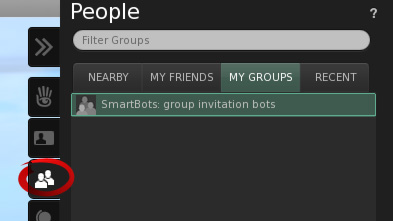
- Open Groups list
- Switch to Roles tab => click Invite
- Type the name of your bot (see your SmartBots account for details).
- Click on Send Invitations button.
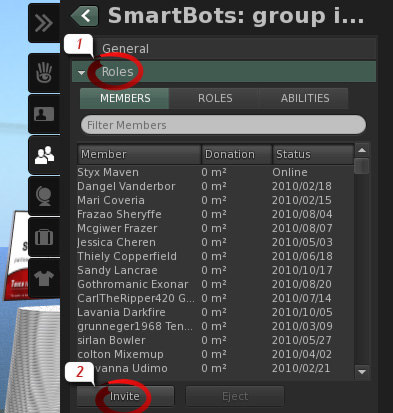
Bot will accept your invitation automatically. If you experience any troubles inviting bot, contact our editor. He will guide you through invitation process.
2. Allowing bot to invite other residents
To allow bot to send direct invitations to Second Life residents, the Invite People to this Group ability must be set for bot.
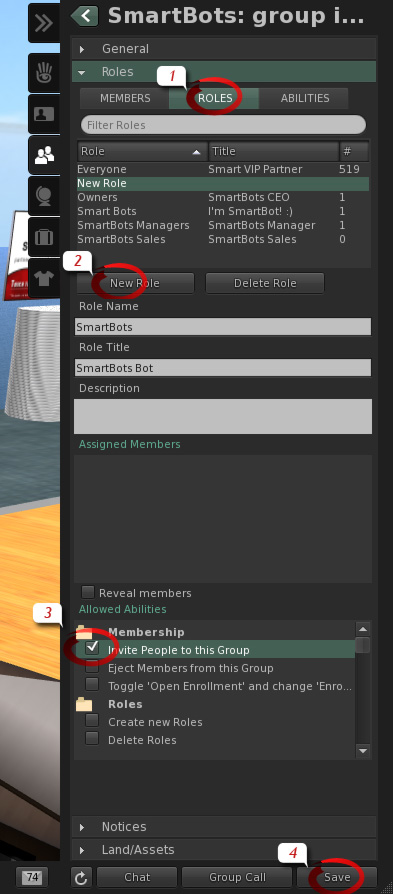
We recommend creating a separate role named Group Inviters.
Open your group details and proceed with the following steps:
- Open Roles tab.
- Click on New Role; enter the Role Name and Title
- Check Invite People to this Group ability.
- Click Save button.
Now assign bot to new Group Inviters role.

- Switch to Members tab and locate the bot under member's listing.
- Check the Group Inviters role checkbox under Assigned Roles.
- Click on Apply.
Setup is complete, and now your bot is able to send group invitations. If you experience any troubles, our editor will help you to manage every step of this manual.