
Greeter
|
QuincyJohnes (Talk | contribs)
|
QuincyJohnes (Talk | contribs)
|
||
| Line 1: | Line 1: | ||
| - | SmartBots also offers a |
+ | SmartBots also offers a '''Greeter application''' that comes free with the [[Personal_Bots|Personal Bot]] Service. |
| - | + | [[Image:Greeter_dashboard_2.png|center|border|link=|650px]] |
|
| - | + | == Main Features == |
|
| + | * '''Dashboard''' to display available bots |
||
| + |
* '''Statistics''' web page: with graphs and history
|
||
| + | * '''Reporting & notification''' settings |
||
| - | == |
+ | == Setting up & configuration == |
| - | + | ||
| - | + | ||
| - | + | ||
| - | + | Greeter can send a '''message''' (Local Chat and/or IM) along with '''group invitation''' and '''inventory offer'''. Each of these options can be separately enabled/disabled.
|
|
| - | To enable the |
+ | To start setting up, click '''Edit settings''' on your '''Greeter dashboard''' and enable the according checkmark. (Below is explained the setup process for each) |
| - | + |
Check below how to setup each option: |
|
| - | + |
<div class=blocksMenuAuto>
|
|
| - | + | * Group Invite |
|
| + | * Local Chat greeting |
||
| + | * IM Greeting |
||
| + | * Inventory Offer |
||
| + | </div> |
||
| - | ''''' |
+ | <div class=blocksMenuAutoBlock> |
| + | |||
| + | === Setting up group invitations === |
||
| + | [[Image:Invite_to_group_option.png|center|border|link=|650px]] |
||
| + | |||
| + | '''Limits''' define how many times an avatar should be invited: |
||
| + | * '''Once:''' Visitor is invited only once |
||
| + | * '''Twice:''' Visitor is invited on first and second visits only |
||
| + | * '''Always:''' Visitor is invited on every visit |
||
| + | |||
| + | '''1 hour delay''' is in place for all the '''Limits''' in-order to prevent same avatars being invited on every visit. |
||
| + | |||
| + | === Selecting the group & role === |
||
| + | |||
| + | '''BE ADVISED:''' |
||
| + | * In-order to function properly, your bot requires '''Group invite permissions.''' Read more details on [https://www.mysmartbots.com/docs/Setting_up_bot_for_invitations Setting up bot for invitations] |
||
| + |
* If your bot must invite to '''Custom role''' (other than "Everyone"). Your bot requires following abilities: ''Assign to assigner's role, Assign to any role, Remove members from roles''
|
||
| + | |||
| + | Click the drop-down menu under '''To group''' and select which group bot should invite to. Under '''Invite to role''' - select the role. |
||
| + | |||
| + | You can also click '''add another group''' to invite in multiple groups. |
||
| + | |||
| + | </div> |
||
| + | |||
| + | <div class=blocksMenuAutoBlock> |
||
| + | |||
| + | === Setting up Local Chat Greeter === |
||
| + | |||
| + | [[Image:Local_Chat_greeting.png|center|border|link=|650px]] |
||
| + | |||
| + |
'''Limits''' define how many times an avatar should be greeted:
|
||
| + | * '''Once:''' Visitor is greeted only once |
||
| + |
* '''Twice:''' Visitor is greeted on first and second visits only
|
||
| + | * '''Always:''' Visitor is greeted on every visit |
||
| + | |||
| + |
'''1 hour delay''' is in place for all the '''Limits''' in-order to prevent same avatars being greeted on every visit. |
||
| + | |||
| + | The drop-down menu allows you to select local chat '''message type''': Say, shout, whisper. |
||
| + | |||
| + | === Variables you can use & Examples === |
||
| + | |||
| + | There are several '''variables''' you can insert into '''greeting text'''. |
||
| + | |||
| + | * '''%FIRST_NAME%''' is converted into '''avatar's first name''' when executed. ''Example: Glaznah Gassner will be obstructed into "Glaznah"'' |
||
| + | * '''%SL_NAME%''' is converted into '''avatar's full SL name''' (Including '''Resident'''). |
||
| + | * '''%VISITOR_SLURL%''' is converted into '''visitor's location URL''' (Where visitor currently is located) |
||
| + | * '''%BOT_SLURL&''' is converted into '''bot's location URL''' (Where bot is currently located) |
||
| + | |||
| + | </div> |
||
| + | |||
| + | <div class=blocksMenuAutoBlock> |
||
| + | |||
| + | === Setting up IM Greeting === |
||
| + | [[Image:IM_Greeter_checkmark.png|center|border|link=|650px]]
|
||
| + | |||
| + | '''Limits''' define how many times an avatar should be greeted: |
||
| + | * '''Once:''' Visitor is greeted only once |
||
| + | * '''Twice:''' Visitor is greeted on first and second visits only |
||
| + | * '''Always:''' Visitor is greeted on every visit |
||
| + | |||
| + | '''1 hour delay''' is in place for all the '''Limits''' in-order to prevent same avatars being greeted on every visit. |
||
| + | |||
| + | The drop-down menu allows you to select local chat '''message type''': Say, shout, whisper. |
||
| + | |||
| + | === Variables you can use & Examples === |
||
| + | |||
| + | There are several '''variables''' you can insert into '''greeting text'''. |
||
| + | |||
| + | * '''%FIRST_NAME%''' is converted into '''avatar's first name''' when executed. ''Example: Glaznah Gassner will be obstructed into "Glaznah"'' |
||
| + | * '''%SL_NAME%''' is converted into '''avatar's full SL name''' (Including '''Resident'''). |
||
| + | * '''%VISITOR_SLURL%''' is converted into '''visitor's location URL''' (Where visitor currently is located) |
||
| + | * '''%BOT_SLURL&''' is converted into '''bot's location URL''' (Where bot is currently located) |
||
| + | |||
| + | </div> |
||
| + | |||
| + | <div class=blocksMenuAutoBlock> |
||
| + | |||
| + |
=== Setting up inventory offer ===
|
||
| + | |||
| + |
[[File:Inventory_offer_checkmark.png|center|link=|650px]] |
||
| + | |||
| + | Your bot additionally (or separately) can send an '''inventory offer'''. |
||
| + | |||
| + | '''Limits''' define how many times an avatar receive an inventory offer: |
||
| + | * '''Once:''' Visitor is greeted only once |
||
| + | * '''Twice:''' Visitor is greeted on first and second visits only |
||
| + | * '''Always:''' Visitor is greeted on every visit |
||
| + | |||
| + |
'''1 hour delay''' is in place for all the '''Limits''' in-order to prevent same avatars being greeted on every visit. |
||
| + | |||
| + |
To select an inventory offer, click '''add item to offer''' - this will open the '''Inventory Browser''' where you can select an item of your choice. It's also possible to add multiple items by repeating the same process.
|
||
| + | |||
| + | === Assigning Copy + Transfer permissions === |
||
| + | |||
| + | In-order to send an inventory offer: Object '''must be copy+trans''', you can set next user permissions using the [[Personal Bot Inventory Browser]] |
||
| + | |||
| + | Alternatively, you can login to your bot '''using Viewer''' and set the next user permissions from '''avatar's inventory'''. |
||
| + | |||
| + | </div> |
||
| + | |||
| + | __NOTOC__ |
||
Revision as of 15:26, 19 April 2019
SmartBots also offers a Greeter application that comes free with the Personal Bot Service.

Main Features
- Dashboard to display available bots
- Statistics web page: with graphs and history
- Reporting & notification settings
Setting up & configuration
Greeter can send a message (Local Chat and/or IM) along with group invitation and inventory offer. Each of these options can be separately enabled/disabled.
To start setting up, click Edit settings on your Greeter dashboard and enable the according checkmark. (Below is explained the setup process for each)
Check below how to setup each option:
- Group Invite
- Local Chat greeting
- IM Greeting
- Inventory Offer
Setting up group invitations
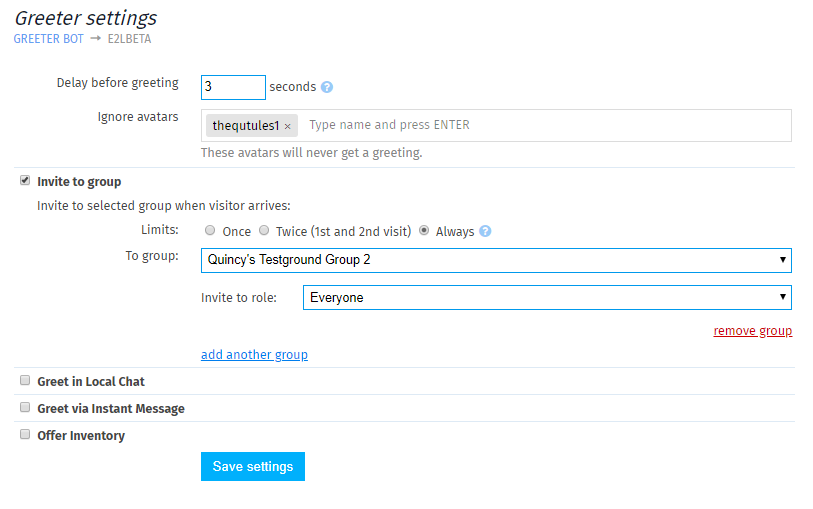
Limits define how many times an avatar should be invited:
- Once: Visitor is invited only once
- Twice: Visitor is invited on first and second visits only
- Always: Visitor is invited on every visit
1 hour delay is in place for all the Limits in-order to prevent same avatars being invited on every visit.
Selecting the group & role
BE ADVISED:
- In-order to function properly, your bot requires Group invite permissions. Read more details on Setting up bot for invitations
- If your bot must invite to Custom role (other than "Everyone"). Your bot requires following abilities: Assign to assigner's role, Assign to any role, Remove members from roles
Click the drop-down menu under To group and select which group bot should invite to. Under Invite to role - select the role.
You can also click add another group to invite in multiple groups.
Setting up Local Chat Greeter
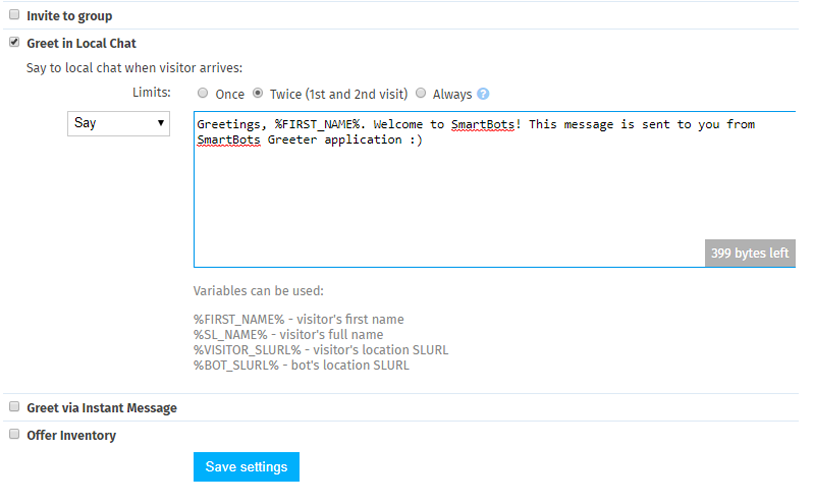
Limits define how many times an avatar should be greeted:
- Once: Visitor is greeted only once
- Twice: Visitor is greeted on first and second visits only
- Always: Visitor is greeted on every visit
1 hour delay is in place for all the Limits in-order to prevent same avatars being greeted on every visit.
The drop-down menu allows you to select local chat message type: Say, shout, whisper.
Variables you can use & Examples
There are several variables you can insert into greeting text.
- %FIRST_NAME% is converted into avatar's first name when executed. Example: Glaznah Gassner will be obstructed into "Glaznah"
- %SL_NAME% is converted into avatar's full SL name (Including Resident).
- %VISITOR_SLURL% is converted into visitor's location URL (Where visitor currently is located)
- %BOT_SLURL& is converted into bot's location URL (Where bot is currently located)
Setting up IM Greeting

Limits define how many times an avatar should be greeted:
- Once: Visitor is greeted only once
- Twice: Visitor is greeted on first and second visits only
- Always: Visitor is greeted on every visit
1 hour delay is in place for all the Limits in-order to prevent same avatars being greeted on every visit.
The drop-down menu allows you to select local chat message type: Say, shout, whisper.
Variables you can use & Examples
There are several variables you can insert into greeting text.
- %FIRST_NAME% is converted into avatar's first name when executed. Example: Glaznah Gassner will be obstructed into "Glaznah"
- %SL_NAME% is converted into avatar's full SL name (Including Resident).
- %VISITOR_SLURL% is converted into visitor's location URL (Where visitor currently is located)
- %BOT_SLURL& is converted into bot's location URL (Where bot is currently located)
Setting up inventory offer

Your bot additionally (or separately) can send an inventory offer.
Limits define how many times an avatar receive an inventory offer:
- Once: Visitor is greeted only once
- Twice: Visitor is greeted on first and second visits only
- Always: Visitor is greeted on every visit
1 hour delay is in place for all the Limits in-order to prevent same avatars being greeted on every visit.
To select an inventory offer, click add item to offer - this will open the Inventory Browser where you can select an item of your choice. It's also possible to add multiple items by repeating the same process.
Assigning Copy + Transfer permissions
In-order to send an inventory offer: Object must be copy+trans, you can set next user permissions using the Personal Bot Inventory Browser
Alternatively, you can login to your bot using Viewer and set the next user permissions from avatar's inventory.