
Setting up bot for invitations (SLV)
To send direct group invites you have to give abilities to the bot. It's easy if you're experienced, otherwise you can follow our instructions below.
We will do the following actions:
- Create the "SmartBots" role in your group, with invitation abilities.
- Add your bot to this role.
(We assume that bot is already in your group. If not yet, click here)
Create new role
We recommend creating a separate role named SmartBots.
Open your group details and proceed with the following steps:
- Open Roles section, Roles tab.
- Click on New Role; enter the Role Name "SmartBots" and Title "SmartBots Bot"
- Important: check the Invite People to this Group ability.
- Click Save button.
Add bot to role
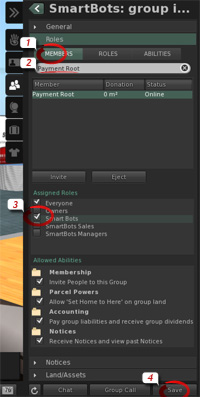
Now add bot to the new SmartBots role.
- Switch to Members tab.
- Type the bot's name to locate it.
- Check the SmartBots role checkbox under Assigned Roles.
- Click on Save.
Setup is complete, and now your bot is able to send group invitations.
Need more help?
If you experience any troubles, contact our manager in-world. He will guide you through setup process.