
Group Tenancy Configuration
Group Tenancy is an add-on for Personal Bots to allow SL groups to rent out membership managed by bot.
To understand how it's being configured, read below:
Adding group/editing
To start adding a new group to account: visit Group Tenancy add-on page, click Add group
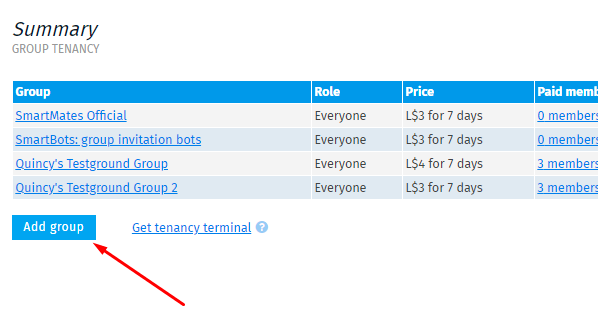
To edit one of the existing group, click on the group name of your choice.
Configuring group
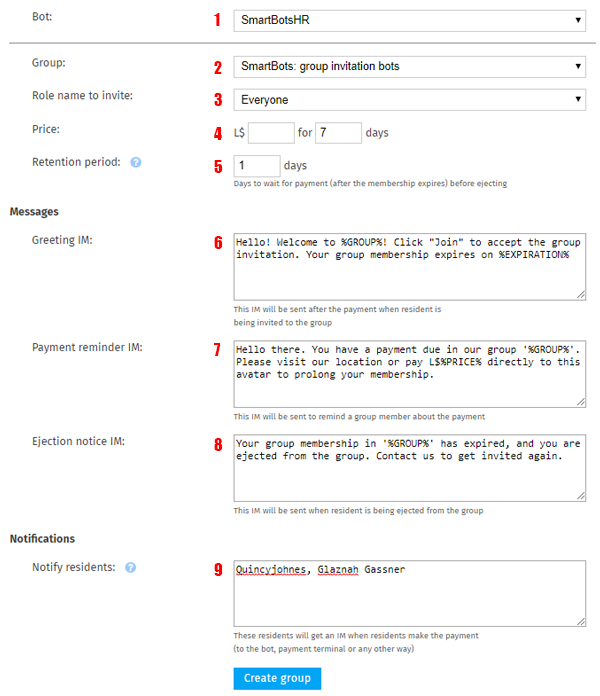
| Label Number | Description |
|---|---|
| 1 Bot | Allows you to choose a bot powered by Group Tenancy add-on |
| 2 Group | Select the group that your bot should manage |
| 3 Role name | Defines which role your bot should invite to after payment (in-case of inviting to custom role, read this) |
| 4 Price for days | You can configure the price of your membership rental for specific amount of time. |
| 5 Retention period | Amount of days after which the bot should execute eject. For example, if retention period is 1 day, after expiration date of membership, but will give member additional day to pay. |
| 6 Greeting IM | Bot sends the following message along with group invite when payment is made |
| 7 Payment reminder IM | Bot sends the message prior to membership expiration date |
| 8 Ejection notice IM | Bot sends the message when group member has been ejected due to no-pay |
| 9 Notify residents | Bot sends the notification messages to list of people (separated by comma) when bot receives new payment or ejects someone (You have to include yourself if you want to receive them as well)
|