
Allowed Residents
Overview
The Allowed resident list allows you to grant specific Second Life residents access to your region, even when public access is disabled.
This is particularly useful for private estates, residential communities, staff members, and other authorized visitors.
Accessing the Allowed Resident List
Open Sim Governor.
Select your Personal Bot.
Select the region you wish to manage.
Under Sim Access, click Allowed resident list.
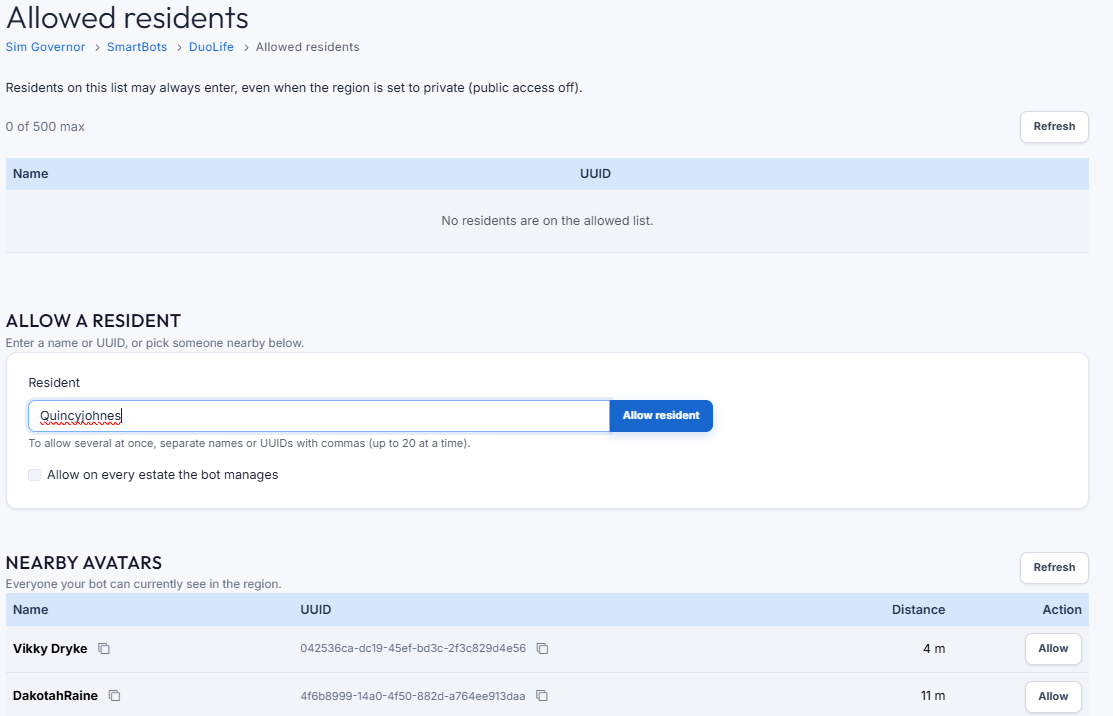
The page displays the residents currently on the allowed list, along with the number of occupied and available entries.
Click Refresh to retrieve the latest list.
Allowing a Resident
Locate the Allow a resident section.
Enter the resident's Second Life name or UUID.
Click Allow resident.
Allowing Multiple Residents
You can add multiple residents at once by separating their names or UUIDs with commas.
A maximum of 20 residents can be submitted at a time.
Allowing Residents Across Multiple Estates
Enable Allow on every estate the bot manages if you want to grant the specified residents access across all estates managed by the selected Personal Bot.
Leave this option disabled if you only want to modify the currently selected estate's access list.
Allowing Nearby Avatars
The Nearby Avatars section displays residents your bot can currently see in the region.
For each resident, the following information is available:
Field | Description |
|---|---|
Name | The resident's Second Life name. |
UUID | The resident's unique identifier. |
Distance | The resident's distance from your bot. |
Action | Allows you to add the resident to the allowed list. |
Click Allow next to a resident to grant them access.
Click Refresh to update the nearby avatars list.