
Managing Estate Managers
Overview
Sim Governor allows you to manage the residents assigned as Estate Managers directly through your SmartBots account.
Estate Managers are authorized residents who can assist with estate administration and perform various region management tasks.
Accessing Estate Manager Settings
Open Sim Governor.
Select your Personal Bot.
Select the region you wish to manage.
Locate the Region Options section.
Click Manage estate managers.
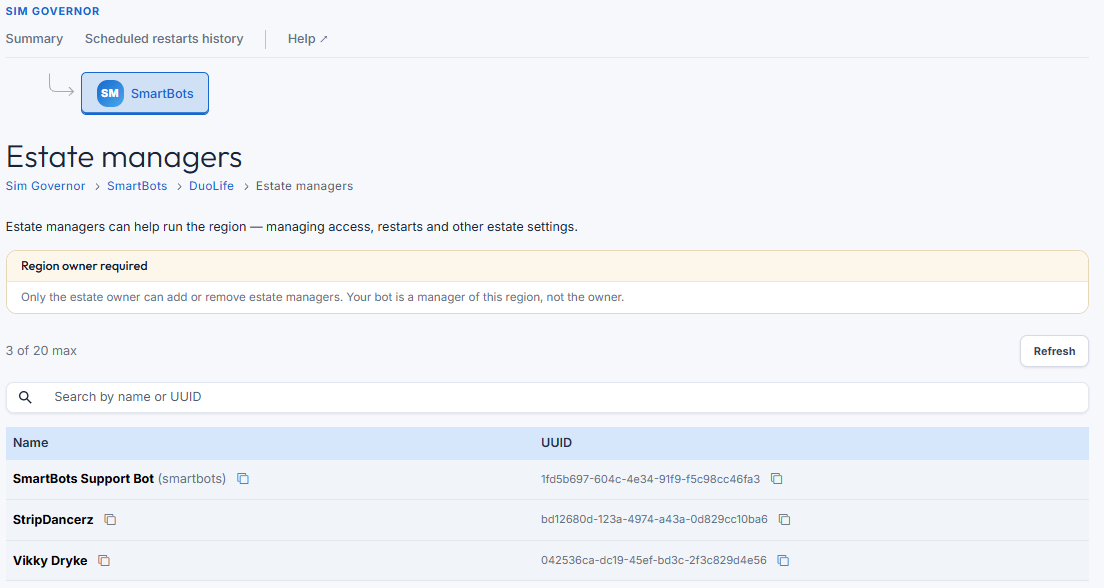
Managing Estate Managers
The Estate Manager management tool allows you to:
Review existing Estate Managers.
Add authorized residents as Estate Managers.
Remove residents who no longer require Estate Manager permissions.
Important Information
Estate Manager permissions provide access to significant estate administration capabilities.
Only assign these permissions to residents you trust to manage your estate.
Make sure your Sim Governor bot retains the necessary permissions to continue performing region administration tasks.