
Banned Residents
Overview
The Banned resident list allows you to manage residents who are prohibited from entering your Second Life region.
Residents on the banned list are ejected from the region and cannot return while their ban remains active.
Accessing the Banned Resident List
Open the Sim Governor Add-On.
Select your Personal Bot.
Select the region you wish to manage.
Under Sim Access, click Banned resident list.
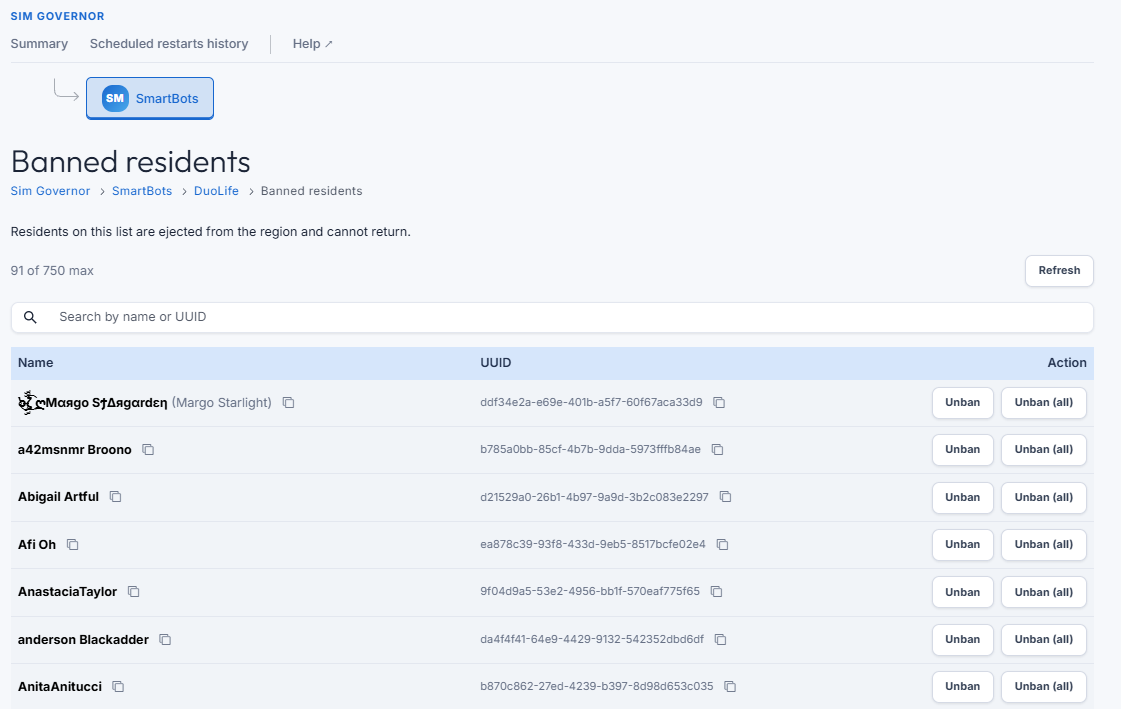
Managing Banned Residents
The banned residents page displays the residents currently on the ban list.
Field | Description |
|---|---|
Name | The resident's Second Life name. |
UUID | The resident's unique Second Life identifier. |
Action | Available actions for removing the resident's ban. |
The page also displays the current number of banned residents and the maximum supported list capacity.
Searching for Residents
Use the Search by name or UUID field to locate a specific resident.
Click Refresh to retrieve the latest ban list.
You can also use the copy icons next to resident names and UUIDs to copy their information.
Removing a Ban
Locate the resident you wish to unban and select the appropriate action:
Unban: Removes the resident's ban from the current estate.
Unban (all): Removes the resident's ban across the estates managed by the bot.
Use the appropriate option depending on whether you want to remove the ban from the current estate or across multiple managed estates.
Banning Residents
Sim Governor also allows you to add residents to the banned list to prevent them from accessing the region.
Maintaining Your Ban List
Over time, your ban list may contain accounts that no longer exist in Second Life.
Sim Governor provides a dedicated cleaning tool that identifies these accounts and allows you to remove them.
For more information, see Cleaning Ban and Allow Lists.