
Sending Region-Wide Messages
Overview
The Send region-wide message tool allows your Personal Bot to send an announcement to every visitor in the selected Second Life region.
Unlike regular local chat messages, region-wide messages appear as pop-up notifications in residents' Second Life viewers.
This feature is useful for maintenance announcements, event notifications, emergency messages, and other important region-wide communications.
Sending a Region-Wide Message
Open Sim Governor.
Select your Personal Bot.
Select the region you wish to manage.
Under Tools, click Send region-wide message.
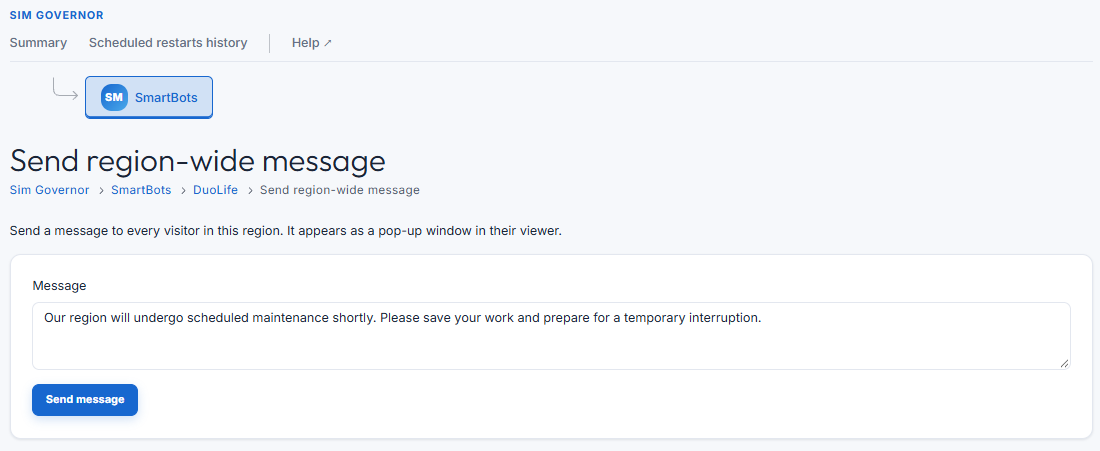
Enter your announcement in the Message field.
Click Send message.
Your message will be delivered to visitors currently present in the selected region.
Example Messages
Scheduled maintenance:
Our region will undergo scheduled maintenance shortly. Please save your work and prepare for a temporary interruption.
Upcoming event:
Our event will begin in 10 minutes! We look forward to seeing you.
Region restart:
This region will be restarting shortly. Thank you for your patience.
Useful Tips
Keep your announcements clear and concise.
Since region-wide messages appear as pop-up notifications, avoid sending unnecessary or repetitive announcements that may interrupt your visitors' activities.