
Kicking Residents
Overview
The Kick resident tool allows you to immediately eject a resident from your Second Life region without adding them to the banned resident list.
Unlike banning, kicking a resident does not prevent them from returning to the region.
Accessing the Kick Resident Tool
Open Sim Governor.
Select your Personal Bot.
Select the region you wish to manage.
Under Sim Access, click Kick resident.
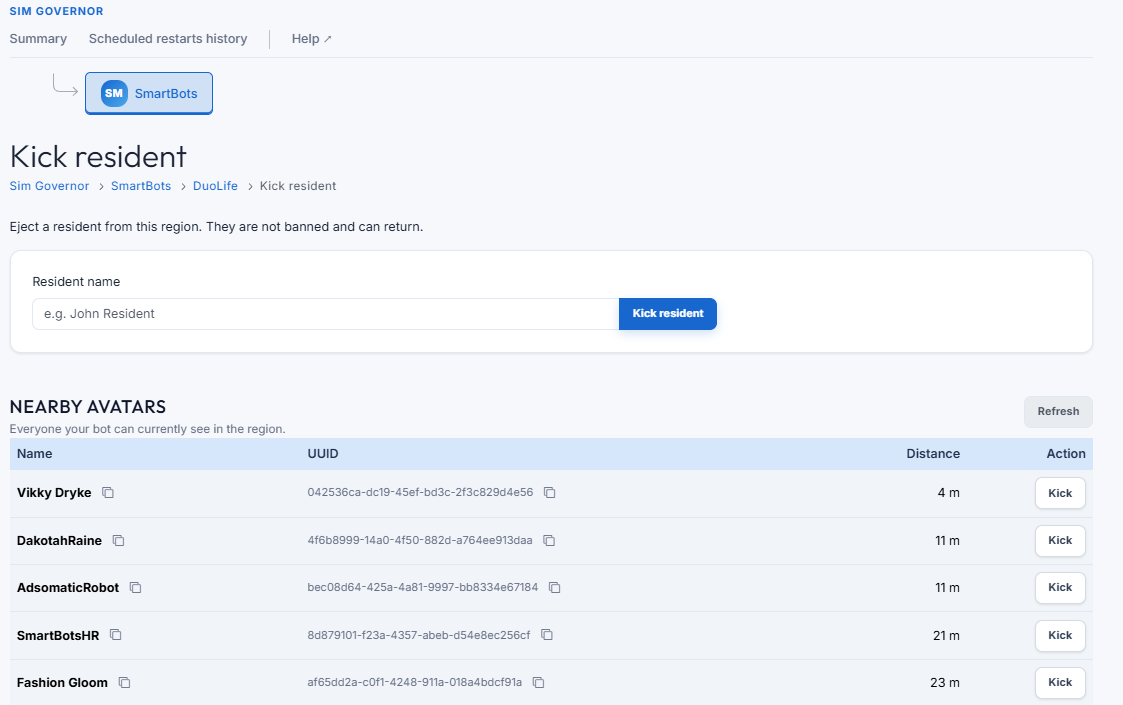
Kicking a Resident by Name
Enter the resident's Second Life name in the Resident name field.
Click Kick resident.
Your bot will eject the specified resident from the region.
Kicking Nearby Avatars
The Nearby Avatars section displays residents your bot can currently see in the region.
The list includes:
Resident names.
Resident UUIDs.
Distance from your bot.
Available actions.
To eject a resident, locate their name and click Kick.
Click Refresh to update the nearby avatars list.
Kicking vs. Banning
Action | Effect |
|---|---|
Kick | Ejects the resident from the region but allows them to return. |
Ban | Ejects the resident and prevents them from returning while the ban remains active. |
If you want to prevent a resident from returning, use the Banned resident list instead.