
Region Access and Options
Overview
The Region Options section allows you to configure region access requirements and additional region settings directly through Sim Governor.
Accessing Region Options
Open Sim Governor.
Select your Personal Bot.
Select the region you wish to manage.
Scroll down to the Region Options section.
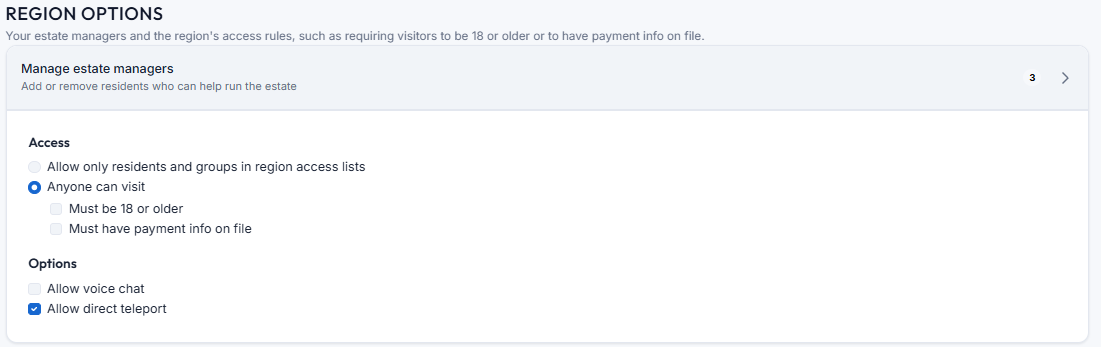
Region Access
The Access section determines who is permitted to enter your region.
Restricted Access
Select Allow only residents and groups in region access lists to restrict access to authorized residents and groups.
This option is useful for private estates, residential communities, and regions that are not intended for public access.
Public Access
Select Anyone can visit to allow public access to your region, subject to the applicable access restrictions.
When public access is enabled, you can configure additional visitor requirements.
Option | Description |
|---|---|
Must be 18 or older | Restricts access to residents who meet the applicable age requirement. |
Must have payment info on file | Restricts access to residents who have payment information registered with their Second Life account. |
Additional Region Options
The Options section allows you to configure additional region functionality.
Option | Description |
|---|---|
Allow voice chat | Enables voice communication within the region. |
Allow direct teleport | Allows residents to teleport directly to locations within the region, subject to applicable Second Life access and landing restrictions. |
Enable or disable these options according to your region's requirements.
Important Information
Changes to region access settings may affect existing visitors and residents attempting to enter your region.
Review your settings carefully, particularly when switching from public to restricted access.
For information about granting access to individual residents, see Allowed Residents.