
Live IM Chat (add-on)
|
QuincyJohnes (Talk | contribs)
|
QuincyJohnes (Talk | contribs)
m (moved Bot Live Chat to Live IM Chat (add-on))
|
||
| (One intermediate revision not shown) | |||
| Line 5: | Line 5: | ||
}} |
}} |
||
| - | == Overview == |
+ | == Overview == |
[[Image:New_dashboard_page_LiveIms.png|center|link=|border]] |
[[Image:New_dashboard_page_LiveIms.png|center|link=|border]] |
||
| - | + |
'''Live IM Chat''' is a user-friendly web interface that allows receiving and sending IMs using your [[Personal Bots|Personal Bot]]. Messages will arrive to recipients like from a normal avatar. |
|
| - | = |
+ |
[[Image:New_Live_IMs_chat.png|center|link=|border]]
|
| - | The |
+ | The interface stores contacts/conversations on the left-side, allowing you to easily switch between them.
|
| - | + | === New messages ===
|
|
| - | + | You will receive several types of notifications about new IMs: |
|
| - | Live Chat |
+ |
* On the '''Live IM Chat page''', new IMs will be displayed on left side as '''unread conversation'''
|
| + | * '''Unread conversation''' will also display in the '''summary page''' along with other useful statistics (First screenshot above) |
||
| + |
* [[Personal Bot HUD|Bot HUD]] will play sound notification and display unread conversation envelope [[Image:HUD_message_notification.png|link=|center|]]
|
||
| - | + |
(it may take 15-30 seconds for SmartBots HUD to display a new message notification icon). |
|
| - | + |
'''Offline messages:''' If the bot owner is offline, the system will keep the unread message(s) until you come online. SmartBots will be using the Live Chat to provide the better quality support for all customers, both new and existing ones. |
|
| - | + | === Additional Options === |
|
| - | ''' |
+ |
Additionally, '''Live IM Chat''' provides other cool functions that you can use for better chatting experience:
|
| + | |||
| + | * Sending '''teleport & friendship offers''' |
||
| + | * '''Downloading IM Chat logs''' |
||
| + | |||
| + |
(We only keep your logs for 2 weeks, it's '''recommended''' to take advantage of this option)
|
||
| + | |||
| + |
[[Image:Features_Live_IM2.png|center|link=|]]
|
||
| + | |||
| + | == Integrations & Settings == |
||
| - | ''' |
+ |
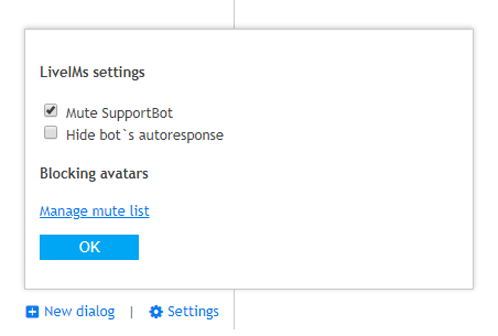
* Settings allow you to temporarily disable [[Alive_Support_Bot|Support Bot Add-On]] while actively browsing '''Live IM Chat''' |
| + |
* Hiding/filtering out bot's autoresponses, that you may have configured with [https://www.mysmartbots.com/docs/Simple_Autoresponder_(add-on) Simple IM Autoresponder]
|
||
| + | * Or quickly access [https://www.mysmartbots.com/docs/MuteList_(add-on) Mute List add-on] to '''block/mute''' unwanted people |
||
| - | = |
+ |
[[Image:Settings.png|center|link=]]
|
| - | + |
== How to purchase ==
|
|
| - | + | See the [[Purchasing Add-Ons]] page for step-by-step add-on activation instructions. |
|
| - | + | == Additional information == |
|
| - | [[ |
+ |
# This add-on can be used only with a [[Personal Bots|Personal Bot]].
|
| + | # You can refund your add-on purchase within 3 days. |
||
[[Category: Personal bots]] |
[[Category: Personal bots]] |
||
__NOTOC__ |
__NOTOC__ |
||
Latest revision as of 14:30, 1 February 2019
This is a bot add-on:
- Buy in web Bot Store
- Then attach to your bot

Overview
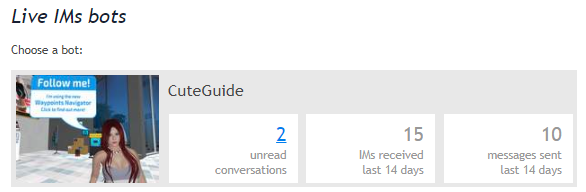
Live IM Chat is a user-friendly web interface that allows receiving and sending IMs using your Personal Bot. Messages will arrive to recipients like from a normal avatar.
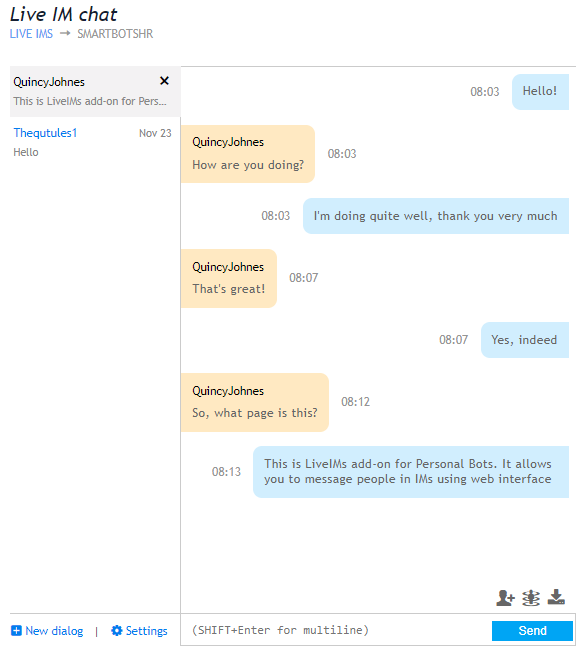
The interface stores contacts/conversations on the left-side, allowing you to easily switch between them.
New messages
You will receive several types of notifications about new IMs:
- On the Live IM Chat page, new IMs will be displayed on left side as unread conversation
- Unread conversation will also display in the summary page along with other useful statistics (First screenshot above)
- Bot HUD will play sound notification and display unread conversation envelope
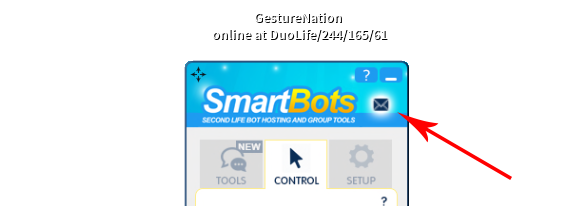
(it may take 15-30 seconds for SmartBots HUD to display a new message notification icon).
Offline messages: If the bot owner is offline, the system will keep the unread message(s) until you come online. SmartBots will be using the Live Chat to provide the better quality support for all customers, both new and existing ones.
Additional Options
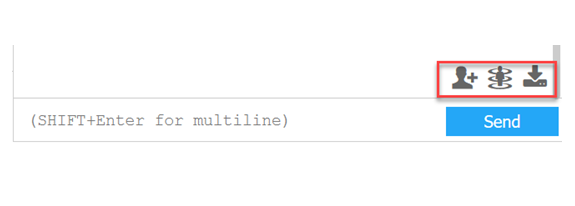
Additionally, Live IM Chat provides other cool functions that you can use for better chatting experience:
- Sending teleport & friendship offers
- Downloading IM Chat logs
(We only keep your logs for 2 weeks, it's recommended to take advantage of this option)
Integrations & Settings
- Settings allow you to temporarily disable Support Bot Add-On while actively browsing Live IM Chat
- Hiding/filtering out bot's autoresponses, that you may have configured with Simple IM Autoresponder
- Or quickly access Mute List add-on to block/mute unwanted people
How to purchase
See the Purchasing Add-Ons page for step-by-step add-on activation instructions.
Additional information
- This add-on can be used only with a Personal Bot.
- You can refund your add-on purchase within 3 days.