Difference between revisions of "HTTP API/Bot Commands/touch attachment"
From SmartBots Developers Docs
m (Gg moved page HTTP API/Bot Commands/attachment touch to HTTP API/Bot Commands/touch attachment) |
|||
| Line 1: | Line 1: | ||
| − | {{DISPLAYTITLE: | + | {{DISPLAYTITLE: touch_attachment}} |
<onlyinclude>Touches an object attached to the bot (HUD or attachment).</onlyinclude> | <onlyinclude>Touches an object attached to the bot (HUD or attachment).</onlyinclude> | ||
| Line 6: | Line 6: | ||
{{API Variables Table}} | {{API Variables Table}} | ||
| − | {{API HTTP Required Vars| | + | {{API HTTP Required Vars|touch_attachment}} |
{{API Variable Group|Input}} | {{API Variable Group|Input}} | ||
| Line 41: | Line 41: | ||
<syntaxhighlight lang="http"> | <syntaxhighlight lang="http"> | ||
| − | action= | + | action=touch_attachment&objectname=Weapons%20HUD&linkset=15 |
</syntaxhighlight> | </syntaxhighlight> | ||
Revision as of 20:48, 21 December 2016
Touches an object attached to the bot (HUD or attachment).
The attached object is being selected by name, and the button to be clicked - by link number.
Variables
The following table shows input values (you send them with the API call) and returned output values.
| Variable | Required | Description | ||
|---|---|---|---|---|
| Input basic parameters: | ||||
| action | yes | = touch_attachment | ||
| apikey | yes | Your personal developer's API key. | ||
| botname | yes | Your bot's SL login. | ||
| secret | yes | Bot access code of your bot. | ||
| dataType | optional | Set to "json" to get JSON reply instead of URL-encoded string | ||
| custom | optional | The custom data (string) to be passed back to caller script. This value will be returned back to the caller in HTTP response. | ||
| Input: | ||||
| objectname | yes | the name of the attached object (exact, including all spaces) | ||
| linkset | yes | the link number of the object to touch. See the "Comments" section below. | ||
| Output: | ||||
| (to be received in http_response LSL event, see docs for details) | ||||
| result | OK - command completed successfully FAIL - command failed | |||
| resulttext | Detailed reason for the failure. | |||
| custom | The value from input "custom" parameter. See above. | |||
Additional "resulttext" values are available:
| ||||
Comments
1. Determining the link number
To determine the right button using Phoenix Firestorm or a similar viewer. Open object editor window to get the exact linkset of the prim:
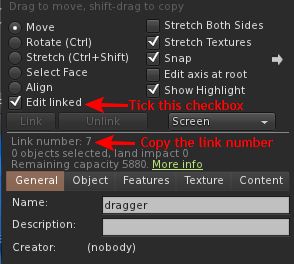
- The link number of the root prim is always "1".
- Single-prim objects are also have linkset=1
2. IMPORTANT: Data availability
Please note that bot loads all nearby prims within 10-20 seconds after startup. Thus, wait a bit after logging in your bot to issue this command.
Examples
Bot locates the "Weapons HUD" on his screen and clicks the button at linkset 15:
action=touch_attachment&objectname=Weapons%20HUD&linkset=15
<< return back to Bot commands
(Miss an API call or parameter? Submit your request in forum)
