Blog tools

Blog archives

SmartBots Official Blog

Subscribe now: important notifications and discount coupons!

Menu Manager: Handle Bot Dialogs From Your Browser

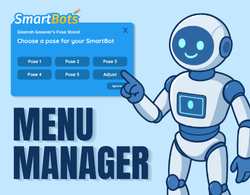
We just released the new Menu Manager add-on! It lets you answer the dialog menus your bot receives and touch nearby objects – all from the web interface, without logging into Second Life.

Every dialog your bot receives appears in the panel with its full text and its complete set of buttons. You see exactly what the bot sees.

What this add-on for?

Imagine your bot standing next to an ATM in Second Life. With Menu Manager, you can interact with the ATM directly from the web interface, use its pop-up menu, and control the device just as if you were in Second Life yourself.

Using radar, select and touch an in-world object. Get dialog menu immediately and select the option you need. You can do that from PC, or mobile, at any time.

Menu Manager works with ATMs, chairs, terminals, dancing poles, pose stands – any object you want to use in Second Life.

Respond in real time

See the dialog immediately as it arrives to your bot. Click the button you want and the response is sent immediately. Rezzers, vendors, security orbs, group tools – anything that throws a dialog at your bot can now be answered from your browser.

Touch nearby objects

The simple radar shows touchable objects the bot can see nearby. Add-on lets you touch them directly from the panel.

Get Menu Manager now!

Menu Manager is available now for L$999 L$649 using the discount code NEWMENUS. Discount code valid only for the next 2 weeks!

As with all our add-ons, future updates are included free for life, and purchases can be refunded within 3 days under our No Questions policy.